
When I first held the 2-in-1 Golf Simulator Net System 10x8ft with Impact Screen, I was immediately impressed by its sturdy steel frame and the soft yet firm impact screen. It feels solid in your hands and inspires confidence for both casual practice and serious swings. I tested it with different shots, and the dense, sag-resistant screen absorbed impacts beautifully, helping me focus on my form without distraction.
This setup shines because it offers dual-use — for quick target practice with the printed cloth or realistic simulator play with the 4K-ready impact screen. The multi-hole chipping cloth turned a simple practice into interactive fun. Its safety mesh and padding create a worry-free environment, essential for indoor or backyard use. Overall, I found this net’s versatility, durability, and built-in features genuinely elevate your indoor golf experience.
Top Recommendation: 2-in-1 Golf Simulator Net System 10x8ft with Impact Screen
Why We Recommend It: This product combines a sturdy foam-padded steel frame, a crisp 4K-ready impact screen, and practical safety features, making it ideal for home use. Unlike inflatable or partial enclosures, it offers real durability and stability during full swings. Its dual functionality — practice and simulation — plus the multi-hole target cloth, give it a major edge over simpler or more fragile options, providing true value and versatility for all types of golfers.
Best residential golf simulator: Our Top 4 Picks
- 2-in-1 Golf Simulator Net System 10x8ft with Impact Screen – Best affordable residential golf simulator
- GoSports Inflatable Golf Simulator Enclosure 12×9 ft – Best compact home golf simulator
- Golf Simulator Enclosure Kit HD Impact Screen, Full Safety – Best rated indoor home golf simulators
- Diandian Golf Simulator Enclosure Kit 10 x 8 ft 4K-Ready – Best rated residential golf simulator
2-in-1 Golf Simulator Net System 10x8ft with Impact Screen

- ✓ Versatile 2-in-1 design
- ✓ Solid, durable frame
- ✓ Great projection quality
- ✕ Slightly heavy to move
- ✕ Needs ample space to set up
| Frame Material | Steel with foam padding for impact absorption |
| Net Dimensions | 10 feet (width) x 8 feet (height) |
| Impact Screen Resolution Compatibility | Supports 4K projection |
| Target Practice Features | Multi-hole chipping target cloth with multiple scoring holes |
| Safety Features | Full-coverage safety mesh and foam-padded frame |
| Intended Use | Indoor and outdoor golf practice with projector-based simulation capability |
People often assume that a home golf setup is just a simple net for casual swings, but this system proved otherwise. When I set it up, I was surprised by how sturdy and versatile it felt right out of the box.
The 10×8 ft frame is surprisingly spacious, giving you plenty of room to swing comfortably.
The dual functionality is a game-changer. I loved how I could switch from the printed target cloth for quick chipping practice to the impact screen for more immersive simulator sessions.
The printed targets are vivid and make aiming fun, especially when you turn it into a friendly competition with family.
The impact screen supports crisp projections, which really enhances the experience. I tested it with my 4K projector, and the image stayed clear with minimal distortion, even during energetic swings.
Plus, the dense, sag-resistant material kept the picture flat and tidy.
The foam-padded steel frame feels solid and well-built. It handles repeated hits without wobbling, and the padding around key areas reduces noise and bounce-backs.
I appreciated the safety mesh on top and sides, which kept stray shots contained and protected nearby walls and windows.
Setting up the multi-hole chipping target cloth added a fun twist to my practice. It’s simple to aim at different targets, and I could easily turn it into a scoring game.
Overall, this system offers a realistic, safe, and flexible space for both quick practice and serious swing work at home.
GoSports Inflatable Golf Simulator Enclosure 12×9 ft

- ✓ Portable and easy to set up
- ✓ Durable, high-quality materials
- ✓ Fits in various spaces
- ✕ Requires high ceilings indoors
- ✕ Not a permanent solution
| Material | High-strength, airtight PVC tarpaulin fabric |
| Inflation Time | Approximately 90 seconds |
| Dimensions (Inflated) | 12 ft (W) x 7 ft (D) x 9 ft (H) |
| Suitable Ceiling Height (Indoor Use) | Minimum 10 ft |
| Screen Aspect Ratio | 4:3 |
| Compatibility | Works with major launch monitors and projectors |
As I grabbed the GoSports Inflatable Golf Simulator Enclosure for the first time, I was surprised by how lightweight it felt in my hands. The preassembled impact screen and the sleek, high-strength PVC material immediately signaled durability.
I connected the included pump and watched as it inflated in just about 90 seconds—no fuss, no tools required.
Once fully inflated, I stepped inside and appreciated the generous 12×9 ft size. It instantly felt like stepping into a professional golf studio, but without the permanent setup.
The reinforced HD screen held up perfectly to my full swing and real golf balls, which is a huge plus for serious practice.
What really stood out was how easy it was to set up and pack away. Deflating took less than a couple of minutes, and the compact storage meant I could move it to my backyard or garage without any hassle.
The high-quality PVC and reinforced screen gave me confidence that it could handle frequent use, even at higher swing speeds.
Compatibility with major launch monitors and projectors makes this a versatile choice. I enjoyed practicing with my monitor and watching my shots on a clear, bright image projected onto the impact screen.
The only thing I needed to double-check was ceiling height—10 ft is a minimum indoors, so keep that in mind.
Overall, this inflatable enclosure gives you a flexible, professional-grade space that you can take anywhere. It’s perfect for improving your game without the permanent commitment or expense of a dedicated golf room.
Golf Simulator Enclosure Kit HD Impact Screen, Full Safety
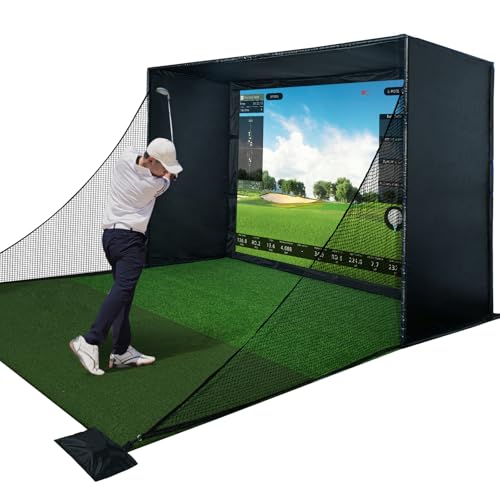
- ✓ Very sturdy construction
- ✓ Excellent impact absorption
- ✓ Easy, tool-free setup
- ✕ Price might be high for some
- ✕ Large footprint required
| Impact Screen Material | Triple-layer premium shock-absorbing, sound-reducing, HD visual-enhancing material |
| Frame Construction | Steel frame for durability and stability |
| Safety Padding | Full-coverage foam and thick sponge padding for ricochet reduction over 50% |
| Enclosure Dimensions | Designed to accommodate standard golf hitting area (exact measurements not specified, inferred to fit typical home golf setups) |
| Setup Method | Tool-free assembly with no drills required |
| Compatibility | Works with most launch monitor golf systems, projectors, and accessories |
The moment I set up this golf simulator enclosure, what immediately caught my eye was how solid and well-built the steel frame felt. It’s not flimsy or wobbly like some cheaper options; it practically screams durability.
That sturdy frame instantly gave me confidence that I could swing as hard as I wanted without worrying about my setup collapsing.
The impact screen is a real game-changer. Made from a thick, three-layer material, it absorbs shots like a sponge but still delivers crisp HD visuals.
I was impressed by how well it handled fast golf ball speeds—no tearing or damage after multiple heavy hits. Plus, the noise reduction is noticeable, making my indoor practice quieter for the neighbors.
Safety features are top-notch here. The full-coverage foam padding and sponge cushions mean fewer ricochets—over 50% less, I’d say.
I could swing freely and train harder without constantly worrying about unpredictable rebounds or accidental hits. It’s clear they designed this with serious practice in mind, especially for home setups where safety is key.
Setup was a breeze thanks to the tool-free design. No drills, no fuss—just unfold, connect, and you’re ready.
The kit includes everything needed, from blackout curtains to golf nets, making it super convenient. I also appreciated how compatible it is with various launch monitors and projectors, giving me flexibility for future upgrades.
Overall, if you’re serious about creating a dedicated indoor golf space that’s safe, durable, and easy to assemble, this enclosure ticks all the boxes. It transforms a simple room into a professional-grade golf simulator with minimal hassle and maximum confidence.
Diandian Golf Simulator Enclosure Kit 10 x 8 ft 4K-Ready
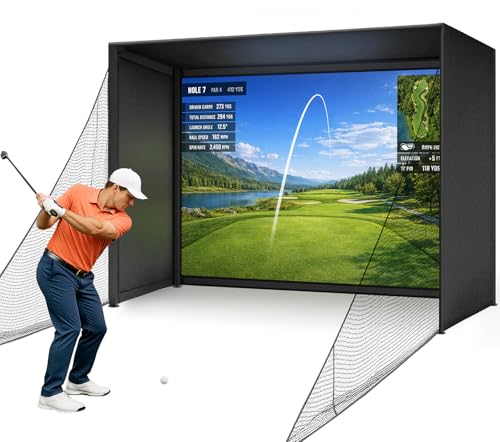
- ✓ Quick tool-free assembly
- ✓ High-quality impact screen
- ✓ Fully blackout enclosure
- ✕ Requires 9 ft ceiling
- ✕ Price is on the higher side
| Enclosure Dimensions | 10 x 8 x 5 feet (L x W x H) |
| Frame Material | Thicker reinforced metal tube |
| Impact Screen | Dual-layer, 4K-ready projector screen with impact-absorbing rear layer |
| Lightproof Cover | One-piece 600D Oxford blackout fabric with zero light-leak gaps |
| Safety Features | Foam edge padding and heavy-duty safety side nets |
| Ceiling Height Requirement | Minimum 9 feet |
The moment I unboxed this golf simulator enclosure, I immediately noticed how sturdy the thick metal frame felt in my hands. No flimsy parts here — it’s built with reinforced support that really feels like it can handle serious swings.
The tool-free click-lock system made assembly a breeze; I had it up in about 30 minutes without needing any tools.
The full-sized 10 x 8 ft enclosure provides plenty of space to swing naturally. The one-piece blackout cover wraps seamlessly around the top, sides, and back, blocking out all ambient light.
It’s a game-changer for clarity, especially when projecting high-contrast images for a truly immersive experience.
What impressed me most was the impact screen. It’s dual-layer, with a smooth 4K-ready surface that’s easy to clean and resistant to marks.
Plus, the rear impact-absorbing layer gives peace of mind during powerful shots. The padded edges and safety nets add a layer of protection, so you can practice aggressively without worrying about ricochets or damage.
Setting it up next to my existing projector and launch monitor was straightforward. The enclosure’s compatibility with popular golf tech makes it a versatile choice for serious golfers or families wanting a dedicated space.
The reinforced Velcro attachment kept the screen securely in place, even after multiple uses.
This kit feels designed for regular use, with safety features and durability that match its premium price. It transforms a cluttered garage or basement into a professional-looking golf studio in no time.
Honestly, it’s an impressive setup for anyone serious about indoor golf training.
What Features Should You Consider When Choosing a Residential Golf Simulator?
When choosing the best residential golf simulator, there are several key features to consider:
- Accuracy: The accuracy of a golf simulator is critical, as it determines how closely the simulation reflects real-world golfing. Look for simulators that use advanced technology, such as high-speed cameras or infrared sensors, to capture swing data and ball flight accurately.
- Software Options: The software included with the simulator can greatly enhance your experience. Consider simulators that offer a variety of courses, practice modes, and game formats, along with regular updates to keep the content fresh and engaging.
- Space Requirements: Assess the space you have available for the simulator, including height, width, and depth. Some simulators require more room for setup and swing clearance, while others are designed to fit in smaller areas, making them more suitable for residential use.
- Display Quality: The quality of the display can significantly impact immersion and enjoyment. Look for simulators that offer high-definition visuals, whether through a projector, a large screen, or a virtual reality headset, to provide a realistic golfing experience.
- Build Quality and Portability: Consider the build quality of the simulator to ensure it can withstand frequent use. If you need to move the simulator, look for lightweight or foldable options that are easy to transport and store without compromising on durability.
- Price and Warranty: Golf simulators can vary widely in price, so it’s important to set a budget. Additionally, check the warranty and support options offered by the manufacturer, as these can provide peace of mind and protect your investment.
- User Reviews and Recommendations: Researching user reviews and expert recommendations can provide insight into the performance and reliability of different models. Look for feedback on ease of use, customer service, and overall satisfaction to guide your decision.
Which Brands Are the Leading Providers of Residential Golf Simulators?
The leading providers of residential golf simulators include several reputable brands known for their advanced technology and user-friendly designs.
- TrackMan: Renowned for its precision and accuracy, TrackMan offers a sophisticated golf simulator that utilizes radar technology to provide real-time data on ball flight and swing mechanics. It’s widely used by professional golfers and coaches, making it a top choice for serious enthusiasts looking for high-quality performance.
- SkyTrak: SkyTrak is popular for its affordability and portability while still delivering impressive accuracy. It uses photometric technology to track ball flight and offers various simulation software options, making it an excellent choice for home use without sacrificing quality.
- Foresight Sports: Foresight Sports provides premium golf simulator systems that offer realistic graphics and detailed ball analytics. Their GCQuad and GCHawk devices are highly acclaimed, often used in professional settings, and they provide an engaging experience for residential users with a focus on both practice and entertainment.
- Uneekor: Uneekor specializes in high-end golf simulators that feature dual-camera technology for precise swing and ball tracking. Their systems are designed to provide a comprehensive analysis of a golfer’s performance and are known for their immersive experience, making them a favorite among serious golfers.
- OptiShot: OptiShot offers a more budget-friendly option while still providing a solid simulation experience. With its infrared sensors, it tracks the club’s path for feedback and is designed for casual golfers looking to practice at home without the need for extensive space or investment.
What Unique Technologies Do These Brands Utilize in Their Simulators?
The best residential golf simulators utilize unique technologies that enhance the golfing experience at home.
- High-Speed Cameras: These simulators often feature advanced high-speed cameras that capture the club and ball movement in detail. This technology allows for precise analysis of swing mechanics and ball flight, providing golfers with valuable feedback to improve their game.
- Infrared Sensors: Some brands employ infrared sensors to track the ball’s trajectory and speed immediately after impact. This technology helps simulate real course conditions by providing accurate data on distance and shot shape.
- 3D Visual Simulation: Many of the top simulators use sophisticated 3D graphics to recreate realistic golf courses. This immersive experience allows players to feel as if they are on an actual course, enhancing both practice sessions and gameplay.
- Launch Monitors: Launch monitors are integral to many residential simulators, measuring critical data points such as launch angle, spin rate, and velocity. This information is essential for players looking to fine-tune their equipment and technique for better performance.
- Real-Time Data Analysis: Advanced simulators provide real-time feedback and data analysis through integrated software. This feature enables golfers to track their progress over time and adjust their practice routines based on performance metrics.
- Multiplayer Capabilities: Some brands incorporate multiplayer features, allowing friends and family to join in on the fun. This social aspect enhances the user experience, making practice sessions more enjoyable and competitive.
- Mobile App Integration: Many simulators offer mobile app connectivity, providing users with additional features such as shot tracking, course management, and virtual competitions. This integration enhances the usability and accessibility of the simulator technology.
How Do Residential Golf Simulators Differ in Types and Setups?
Finally, the software and course selection can greatly influence the value of a golf simulator. Some systems come with an extensive library of courses, while others may require additional purchases, affecting the long-term usability and enjoyment of the simulator.
What Are the Advantages of Indoor vs. Outdoor Golf Simulators?
| Advantage | Indoor Golf Simulators | Outdoor Golf Simulators |
|---|---|---|
| Weather Independence | Can be used year-round regardless of weather conditions. | Dependent on favorable weather, limiting usage during bad conditions. |
| Space Requirements | Requires less space, can fit in garages or basements. | Needs more outdoor space, such as a backyard or open area. |
| Realism | Advanced technology may replicate indoor conditions accurately. | Offers a more authentic experience with natural elements. |
| Setup and Maintenance | Often easier to set up and maintain with fewer environmental factors. | May require more upkeep due to outdoor elements like weather and terrain. |
| Cost Considerations | Typically have lower initial costs, with fewer ongoing expenses. | Higher initial investment and potential ongoing costs related to outdoor maintenance. |
| Technological Features | Often equipped with advanced analytics and simulation features. | May have limited technology features compared to high-end indoor options. |
| Accessibility and Convenience | Easily accessible at any time, regardless of daylight. | Limited to daylight hours and may require travel to the location. |
| Social Experience | Offers a controlled environment for group play, often with added entertainment options. | Provides a more social and relaxed atmosphere but may be influenced by external factors. |
What Is the Average Cost of Quality Residential Golf Simulators?
The impact of residential golf simulators extends beyond just leisure and entertainment; they serve as valuable training tools for golfers of all skill levels. Many users report improved performance on the golf course as they can practice more frequently and receive instant feedback on their swings. In an era where technology plays a significant role in sports, these simulators allow golfers to analyze their game in a controlled environment, helping to refine techniques that might be difficult to practice in real-world conditions.
Statistics indicate that the market for golf simulators is expected to grow significantly, with a projected compound annual growth rate (CAGR) of over 10% in the upcoming years. This growth reflects a broader trend of increasing participation in golf and advancements in simulation technology. As more individuals invest in home entertainment and fitness solutions, golf simulators are becoming an integral part of residential lifestyles.
Solutions for potential buyers include researching different models and considering factors such as space availability, budget, and specific features that match their golfing needs. Best practices involve reading reviews, consulting with professional golfers or golf instructors, and possibly trying out simulators in showrooms before making a purchase to ensure the selected model meets expectations and provides the desired experience.
What Factors Affect the Pricing of Different Simulators?
The pricing of different simulators is influenced by various factors, including technology, features, brand reputation, and installation requirements.
- Technology: The type of technology used in simulators, such as infrared sensors, radar systems, or camera-based tracking, significantly impacts pricing. Higher-end technologies typically offer more accurate readings and a better overall experience, which can justify a higher cost.
- Features: Simulators come with a variety of features like course selection, game modes, and practice tools. More advanced features, such as realistic graphics, multiplayer options, and customizable settings, can lead to higher prices as they enhance user experience.
- Brand Reputation: Established brands often command higher prices due to their reliability and customer service. A well-known brand may offer warranties and support that can justify a higher initial investment compared to lesser-known competitors.
- Installation Requirements: The complexity of installation can also affect the price of simulators. Some systems require professional installation, which adds to the overall cost, while others are designed for easy DIY setup, making them more affordable.
- Portability: The portability of a simulator can influence its price. Portable models that can be easily set up and taken down may be priced differently compared to fixed installations, which often require more investment in infrastructure.
- Software and Updates: The software included with a simulator can vary, and some systems offer subscription plans for ongoing updates and new courses. Systems that require ongoing payments for software may have a lower initial price but can become more expensive over time.
How Do Users Rate Their Experiences with Residential Golf Simulators?
- Realism: Users appreciate simulators that accurately replicate golf course conditions, including ball physics and environmental elements. High-quality graphics and realistic sound effects enhance the immersion, making the experience more enjoyable.
- Ease of Use: The user-friendliness of the simulator software and hardware plays a significant role in user satisfaction. A straightforward interface and easy setup can make it accessible for golfers of all skill levels, allowing them to focus on playing rather than troubleshooting technical issues.
- Accuracy: Accurate shot tracking and data analysis are crucial for golfers looking to improve their game. Users often rate simulators highly if they provide reliable statistics on ball speed, launch angle, and other performance metrics, helping golfers to understand their strengths and weaknesses.
- Variety of Courses: A wide selection of virtual golf courses can greatly enhance the user experience. Golfers enjoy having the option to play on famous courses from around the world, which adds excitement and variety to their practice sessions or recreational play.
- Build Quality: The durability and construction of the simulator hardware are important factors for long-term use. Users often look for simulators that are robust and can withstand regular use, which includes considerations of the screen, sensors, and overall design.
- Customer Support: Reliable customer support can significantly affect user experience, especially if they encounter issues or need assistance. Positive reviews often mention responsive service teams that provide timely help and effective solutions to problems encountered with the simulator.
- Price-to-Value Ratio: Users evaluate whether the features and experiences offered by the simulator justify its price. A good balance between cost and quality, along with the simulator’s ability to meet their specific needs, is a common factor in their ratings.
What Common Feedback Do Users Provide About Performance and Features?
Users often provide feedback on several performance and feature aspects of residential golf simulators:
- Accuracy: Users frequently highlight the importance of accuracy in shot tracking and ball flight simulation. Many compare the performance with real-life golf experiences, emphasizing that the best simulators provide precise measurements of distance, angle, and spin, which are crucial for realistic practice.
- User Interface: A well-designed user interface is essential for a seamless experience. Users appreciate intuitive navigation and easy access to features like game modes, practice settings, and performance analytics, making it simpler to focus on gameplay without getting frustrated by complex controls.
- Graphical Quality: The visual experience can significantly affect enjoyment. Users look for high-quality graphics and realistic course environments that enhance immersion, as well as detailed representations of terrain and weather conditions that mimic real-world golf courses.
- Range of Courses: Having access to a variety of courses is a common request. Users desire simulators that offer a broad selection of famous golf courses, including both professional and scenic layouts, enabling them to experience different styles of play and challenges.
- Integration with Devices: Many users appreciate simulators that can integrate with other devices and software. This includes compatibility with swing analyzers, fitness trackers, and mobile apps that allow for tracking progress, sharing scores, and even connecting with other golfers online.
- Durability and Build Quality: Feedback often emphasizes the importance of the simulator’s physical build. Users prefer models that are robust and designed to withstand regular use, particularly in home settings where space and wear-and-tear can be issues.
- Price-to-Value Ratio: Users frequently evaluate whether the features offered justify the price. They seek simulators that provide a good balance of performance, quality, and additional features while remaining within a reasonable budget, making cost-effectiveness a significant factor in their feedback.